Kamis, 25 November 2010

CCNA Discovery 3 Module 3

Wide Satrio Putra
06468
Pend.Teknik Informatika

1.
1
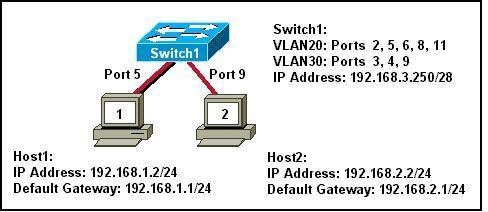
Refer to the exhibit. What two statements can be concluded from the information that is shown in the exhibit? (Choose two.)
• All ports that are listed in the exhibit are access ports.
• ARP requests from Host1 will be forwarded to Host2.
• Attaching Host1 to port 3 will automatically allow communication between both hosts.
• The default gateway for each host must be changed to 192.168.3.250/28 to allow communication between both hosts.
• A router connected to the switch is needed to forward traffic between the hosts.
2.
2
A router is configured to connect to a trunked uplink as shown in the exhibit. A packet is received on the FastEthernet 0/1 physical interface from VLAN 10. The packet destination address is 192.168.1.120. What will the router do with this packet?
• The router will forward the packet out interface FastEthernet 0/1.1 tagged for VLAN 10.
• The router will forward the packet out interface FastEthernet 0/1.2 tagged for VLAN 60.
• The router will forward the packet out interface FastEthernet 0/1.3 tagged for VLAN 60.
• The router will forward the packet out interface FastEthernet 0/1.3 tagged for VLAN 120.
• The router will not process the packet since the source and destination are on the same subnet.
• The router will drop the packet since no network that includes the source address is attached to the router.

3. The information contained in a BPDU is used for which two purposes? (Choose two.)
• to prevent loops by sharing bridging tables between connected switches
• to set the duplex mode of a redundant link
• to determine the shortest path to the root bridge
• to determine which ports will forward frames as part of the spanning tree
• to activate looped paths throughout the network
4. A router has two serial interfaces and two Fast Ethernet interfaces. This router must be connected to a WAN link and to a switch that supports four VLANs. How can this be accomplished in the most efficient and cost-effective manner to support inter-VLAN routing between the four VLANs?
• Connect a smaller router to the serial interface to handle the inter-VLAN traffic.
• Add two additional Fast Ethernet interfaces to the router to allow one VLAN per interface.
• Connect a trunked uplink from the switch to one Fast Ethernet interface on the router and create logical subinterfaces for each VLAN.
• Use serial-to-Fast Ethernet transceivers to connect two of the VLANs to the serial ports on the router. Support the other two VLANs directly to the available FastEthernet ports.
5. When are MAC addresses removed from the CAM table?
• at regular 30 second intervals
• when a broadcast packet is received
• when the IP Address of a host is changed
• after they have been idle for a certain period of time
6.
3
Refer to the exhibit. Switch1 is not participating in the VTP management process with the other switches. Which two are possible reasons for this? (Choose two.)
• Switch2 is in transparent mode.
• Switch1 is in client mode.
• Switch1 is using VTP version 1 and Switch2 is using VTP version 2.
• Switch2 is in server mode.
• Switch1 is in a different management domain.
• Switch1 has no VLANs.
7. Which three must be used when a router interface is configured for VLAN trunking? (Choose three.)
• one subinterface per VLAN
• one physical interface for each subinterface
• one IP network or subnetwork for each subinterface
• one trunked link per VLAN
• a management domain for each subinterface
• a compatible trunking protocol encapsulation for each subinterface
8.
4
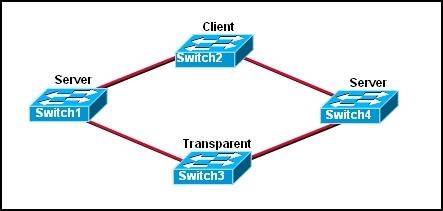
Refer to the exhibit. The switches are connected with trunks within the same VTP management domain. Each switch is labeled with its VTP mode. A new VLAN is added to Switch3. This VLAN does not show up on the other switches. What is the reason for this?
• VLANs cannot be created on transparent mode switches.
• Server mode switches neither listen to nor forward VTP messages from transparent mode switches.
• VLANs created on transparent mode switches are not included in VTP advertisements.
• There are no ports assigned to the new VLAN on the other switches.
• Transparent mode switches do not forward VTP advertisements.
9. Which two criteria are used by STP to select a root bridge? (Choose two.)
• memory size
• bridge priority
• switching speed
• number of ports
• base MAC address
• switch location
10. Which three steps should be taken before moving a Catalyst switch to a new VTP management domain? (Choose three.)
• Reboot the switch.
• Reset the VTP counters to allow the switch to synchronize with the other switches in the domain.
• Download the VTP database from the VTP server in the new domain.
• Configure the VTP server in the domain to recognize the BID of the new switch.
• Select the correct VTP mode and version.
• Configure the switch with the name of the new management domain.
11. Which two items will prevent broadcasts from being sent throughout the network? (Choose two.)
• bridges
• routers
• switches
• VLANs
• hubs
12. Which two characteristics describe a port in the STP blocking state? (Choose two.)
• provides port security
• displays a steady green light
• learns MAC addresses as BPDUs are processed
• discards data frames received from the attached segment
• receives BPDUs and directs them to the system module
13. What is the first step in the process of convergence in a spanning tree topology?
• election of the root bridge
• determination of the designated port for each segment
• blocking of the non-designated ports
• selection of the designated trunk port
• activation of the root port for each segment
14. In which STP state does a switch port transmit user data and learn MAC addresses?
• blocking
• learning
• disabling
• listening
• forwarding
15. What is the purpose of VTP?
• maintaining consistency in VLAN configuration across the network
• routing frames from one VLAN to another
• routing the frames along the best path between switches
• tagging user data frames with VLAN membership information
• distributing BPDUs to maintain loop-free switched paths
16. Which statement best describes adaptive cut-through switching?
• The switch initially forwards all traffic using cut-through switching and then changes to store-and-forward switching if errors exceed a threshold value.
• The switch initially forwards all traffic using cut-through switching and then changes to fast-forward switching if errors exceed a threshold value.
• The switch initially forwards all traffic using cut-through switching and then temporarily disables the port if errors exceed a threshold value.
• The switch initially forwards all traffic using store-and-forward switching and then changes to cut-through switching if errors exceed a threshold value.
17. Using STP, how long does it take for a switch port to go from the blocking state to the forwarding state?
• 2 seconds
• 15 seconds
• 20 seconds
• 50 seconds
18.
5
Refer to the exhibit. The switches are interconnected by trunked links and are configured for VTP as shown. A new VLAN is added to Switch1. Which three actions will occur? (Choose three.)
• Switch1 will not add the VLAN to its database and will pass the update to Switch 2.
• Switch2 will add the VLAN to its database and pass the update to Switch3.
• Switch3 will pass the VTP update to Switch4.
• Switch3 will add the VLAN to its database.
• Switch4 will add the VLAN to its database.
• Switch4 will not receive the update.
19 Which Catalyst feature causes a switch port to enter the spanning-tree forwarding state immediately?
• backbonefast
• uplinkfast
• portfast
• rapid spanning tree
20.
6
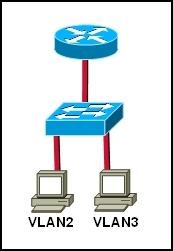
Refer to the exhibit. Which set of commands would be used on the router to provide communication between the two hosts connected to the switch?
• Router(config)# interface vlan 2
Router(config-if)# ip address 192.168.2.1 255.255.255.0
Router(config-if)# no shutdown
Router(config)# interface vlan 3
Router(config-if)# ip address 192.168.3.1 255.255.255.0
Router(config-if)# no shutdown
• Router(config)# interface fastethernet 0/0
Router(config-if)# no shutdown
Router(config-if)# interface fastethernet 0/0.2
Router(config-subif)# encapsulation dot1q 2
Router(config-subif)# ip address 192.168.2.1 255.255.255.0
Router(config-if)# interface fastethernet 0/0.3
Router(config-subif)# encapsulation dot1q 3
Router(config-subif)# ip address 192.168.3.1 255.255.255.0
• Router(config)# interface vlan 2
Router(config-if)# switchport mode trunk dot1q
Router(config)# interface vlan 3
Router(config-if)# switchport mode trunk dot1q
• Router(config)# interface fastethernet 0/0
Router(config-if)# mode trunk dot1q 2 3
Router(config-if)# ip address 192.168.2.1 255.255.255.0

CCNA Discovery 3 Module 2

Wide Satrio Putra
06468
Pend.Teknik Informatika

1. What type of connection point is a point of presence (POP)?
• between a client and a host
• between two local networks
• between a computer and a switch
• between an ISP and an Enterprise network

2. A network administrator needs to configure Telnet access to a router. Which group of commandsenable Telnet access to the router?
• Router(config)# enable password class
Router(config)# line con 0
Router(config-line)# login
Router(config-line)# password cisco
• Router(config)# ip host 192.168.1.1 NewYork
Router(config)# enable password cisco
• Router(config)# line aux 0
Router(config-line)# login
Router(config-line)# password cisco
• Router(config)# enable password class
Router(config)# line vty 0 4
Router(config-line)# login
Router(config-line)# password cisco

3. Which two types of information should be included in a business continuity plan? (Choose two.)
• maintenance time periods
• intrusion monitoring records
• offsite data storage procedures
• alternate IT processing locations*
• problem resolution escalation steps

4. Which two router parameters can be set from interface configuration mode? (Choose two.)
• IP address
• Telnet password
• hostname
• console password
• subnet mask
• enable secret password

5. Which two devices protect a corporate network against malicious attacks at the enterprise edge ?(Choose two.)
• demarc
• IP security (IPSec)
• Data Service Unit (DSU)
• intrusion prevention system (IPS)
• intrusion detection system (IDS)

6. Which three steps must be performed to remove all VLAN information from a switch but retain therest of the configuration? (Choose three.)
• Remove all VLAN associations from the interfaces.
• Remove the 802.1q encapsulation from the interfac
• Issue the command copy start run.
• Issue the command delete flash:vlan.dat.
• Issue the command erase start.
• Reload the switch.

7. What is the demarcation?
• physical point where the ISP responsibilty ends and the customer responsibilty begins
• physical location where all server farm connections meet before being distributed into the Core
• point of entry for outside attacks and is often vulnerable
• point of entry for all Access Layer connections from the Distribution Layer devices

8. Which device is responsible for moving packets between multiple network segments?
• router
• switch
• CSU/DSU
• IDS device

10. What information can an administrator learn using the show version command?
• Cisco IOS filename
• configured routing protocol
• status of each interface
• IP addresses of all interfaces

11. Which two situations require a network administrator to use out-of-band management to change arouter configuration? (Choose two.)
• Network links to the router are down.
• No Telnet password has been configured on the router.
• The administrator can only connect to the router using SSH.
• The network interfaces of the router are not configured with IP addresses.
• Company security policy requires that only HTTPS be used to connect to routers.

12. It is crucial that network administrators be able to examine and configure network devices fromtheir homes. Which two approaches allow this connectivity without increasing vulnerability to externalattacks? (Choose two.)
• Configure a special link at the POP to allow external entry from the home computer.
• Set up VPN access between the home computer and the network.
• Install a cable modem in the home to link to the network.
• Configure ACLs on the edge routers that allow only authorized users to access management portson network devices.
• Configure a server in the DMZ with a special username and password to allow external access.

13. A network administrator must define specific business processes to implement if a catastrophicdisaster prevents a company from performing daily business routines. Which portion of the networkdocumentation is the administrator defining?
• business security plan
• business continuity plan
• network solvency plan
• service level agreement
• network maintenance plan

14. A DoS attack crippled the daily operations of a large company for 8 hours. Which two optionscould be implemented by the network administrator to possibly prevent such an attack in the future?(Choose two.)
• install security devices with IDS and IPS at the enterprise edge
• reset all user passwords every 30 days
• filter packets based on IP address, traffic pattern, and protocol
• deny external workers VPN access to internal resources
• ensure critical devices are physically secure and placed behind the demarc

15. A network manager wants to have processes in place to ensure that network upgrades do not affectbusiness operations. What will the network manager create for this purpose?
• business security plan
• business continuity plan
• service level agreement
• network maintenance plan

16. An investment company has multiple servers that hold mission critical datThey are worried that ifsomething happens to these servers, they will lose this valuable information. Which type of plan isneeded for this company to help minimize loss in the event of a server crash?
• business security
• business continuity
• network maintenance
• service level agreement

17. When searching for information about authentication methods and usernames of companypersonnel, where can a network administrator look?
• Business Continuity Plan
• Business Security Plan
• Network Maintenance Plan
• Service Level Agreement

18. Refer to the exhibit. Which statement is true about port Fa5/1?
• When a violation is detected, the port will log the information to a syslog server.
• When a violation is detected, the port will go into err-disable mod
• There have been 11 security violations since the last reloa
• The port is currently in the shutdown state.

CCNA Discovery 3 Module 1

Wide Satrio Putra
06468
Pend.Teknik Informatika

1. What can be found at the enterprise edge?
• Internet, VPN, and WAN modules
• Internet, PSTN, and WAN services
• server farms and network management
• campus infrastructure, including access layer devices

2. In which functional area of the Cisco Enterprise Architecture should IDS and IPS be located to detect
• and prevent services from accessing hosts?
• Enterprise Campus
• Edge Distribution
• Enterprise Edge
• Service Provider Edge

3. A business consultant must use Internet websites to research a report on the e-business strategies of several firms and then electronically deliver the report to a group of clients in cities throughout the world. Which two teleworker tools can the consultant use to accomplish this project? (Choose two.)
• VoIP
• VPN
• HTTP
• Telnet
• email

4. Which two measures help ensure that a hardware problem does not cause an outage in an enterprise LAN that supports mission critical services? (Choose two.)
• providing failover capability
• installing redundant power supplies
• purchasing more bandwidth from the ISP
• implementing broadcast containment with VLANs
• installing routers that can handle a greater amount of throughput

5. Which task would typically only require services located at the access layer of the hierarchical design model?
• connecting to the corporate web server to update sales figures
• using a VPN from home to send data to the main office servers
• printing a meeting agenda on a local departmental network printer
• placing a VoIP call to a business associate in another country
• responding to an e-mail from a co-worker in another department

6. How does a VPN work to support remote user productivity?
• It uses SSL to encrypt remote user logins to the corporate intranet.
• It uses secure Telnet for remote user connections to internal network devices.
• It creates a virtual circuit that allows real-time communications between any two Internet endpoints.
• It uses encapsulation to create a secure tunnel for transmission of data across non-secure networks.

7. A remote user needs to access a networking device on the internal network of the company. The transactions between the remote user and the device must be secure. Which protocol enables this to happen securely?
• HTTP
• SSH
• Telnet
• FTP

8. What does VoIP provide to telecommuters?
• high-quality, live-video presentations
• real-time voice communications over the Internet
• ability to share desktop applications simultaneously
• secure, encrypted data transmissions through the Internet

9. Which functional component of the Cisco Enterprise Architecture is responsible for hosting internal servers?
• enterprise campus
• enterprise edge
• service provider edge
• building distribution

10. What is the purpose of the Cisco Enterprise Architecture?
• remove the three-layer hierarchical model and use a flat network approach
• divide the network into functional components while still maintaining the concept of Core, Distribution, and Access Layers
• provide services and functionality to the core layer by grouping various components into a single
• component located in the access layer
• reduce overall network traffic by grouping server farms, the management server, corporate intranet, and e-commerce routers in the same layer

11. Which two solutions would an enterprise IT department use to facilitate secure intranet access for remote workers? (Choose two.)
• VPN
• NAT
• user authentication
• client firewall software
• packet sniffing

12. Which statement describes the difference between an enterprise WAN and an enterprise extranet?
• An enterprise WAN is designed to interconnect local LANs, while an enterprise extranet is designed to interconnect remote branch offices.
• An enterprise WAN is designed to interconnect branch offices, while an enterprise extranet is designed to give access to external business partners.
• An enterprise WAN is designed to provide remote access for its teleworkers, while an enterprise extranet is designed to provide Internet connectivity for the enterprise.
• An enterprise WAN is designed to provide Internet connectivity for the enterprise, while an enterprise extranet is designed to provide remote access to the enterprise network for teleworkers.

13. Why would a network administrator want to limit the size of failure domains when designing a network?
• reduces the effect of Ethernet collisions
• reduces the impact of a key device or service failure
• reduces the impact of Internet congestion on critical traffic
• reduces the impact of blocking broadcast packets at the edge of the local network

14. What is the main purpose of the Access Layer in a hierarchically designed network?
• performs routing and packet manipulation
• supplies redundancy and failover protection
• provides a high-speed, low-latency backbone
• serves as a network connection point for end-user devices

15. Which three functions are performed at the Distribution Layer of the hierarchical network model? (Choose three.)
• forwards traffic that is destined for other networks
• isolates network problems to prevent them from affecting the Core Layer
• allows end users to access the local network
• provides a connection point for separate local networks
• transports large amounts of data between different geographic sites
• forwards traffic to other hosts on the same logical network

16. What is a benefit of having an extranet?
• It provides web-like access to company information for employees only.
• It limits access to corporate information to secure VPN or remote access connections only.
• It allows customers and partners to access company information by connecting to a public web server.
• It allows suppliers and contractors to access confidential internal information using controlled external connections.

17. What are two important characteristics or functions of devices at the Enterprise Edge? (Choose two.)
• providing Internet, telephone, and WAN services to the enterprise network
• providing a connection point for end-user devices to the enterprise network
• providing high-speed backbone connectivity with redundant connections
• providing intrusion detection and intrusion prevention to protect the network against malicious activity
• providing packet inspection to determine if incoming packets should be allowed on the enterprise network

18. Why is TCP the preferred Layer 4 protocol for transmitting data files?
• TCP is more reliable than UDP because it requires lost packets to be retransmitted.
• TCP requires less processing by the source and destination hosts than UDP.
• UDP introduces delays that degrade the quality of the data applications.
• TCP ensures fast delivery because it does not require sequencing or acknowlegements.

19. The ABC Corporation implements the network for its new headquarters using the Cisco Enterprise Architecture. The network administrator wants to filter the traffic from and to the outside world. Where should the administrator deploy a firewall device?
• server farm
• enterprise edge
• enterprise campus
• service provider edge

20. Which two statements are reasons why UDP is used for voice and video traffic instead of TCP?(Choose two.)
• TCP requires all data packets to be delivered for the data to be usable.
• The acknowledgment process of TCP introduces delays that break the streams of data.
• UDP does not have mechanisms for retransmitting lost packets.
• UDP tolerates delays and compensates for them.
• TCP is a connectionless protocol that provides end-to-end reliability.
• UDP is a connection-oriented protocol that provides end-to-end reliability.

CCNA2 - Lab 5.2.3 Configuring an ISR with SDM Express

Wide Satrio Putra
06468
Pend.Teknik Informatika

Objectives
· Configure basic router global settings – router name, users, and login passwords – using Cisco SDM Express.
· Configure LAN and Internet connections on a Cisco ISR using Cisco SDM Express.

Background / Preparation
Cisco Router and Security Device Manager (SDM) is a Java-based web application and a device-management tool for Cisco IOS Software-based routers. The Cisco SDM simplifies router and security configuration through the use of smart wizards, which allows you to deploy, configure, and monitor a Cisco router without requiring knowledge of the command-line interface (CLI). The Cisco SDM is supported on a wide range of Cisco routers and Cisco IOS Software releases. Many newer Cisco routers come with SDM preinstalled. If you are using an 1841 router, SDM (and SDM Express) is pre-installed. This lab assumes the use of a Cisco 1841 router. You can use another router model as long as it is capable of supporting SDM. If you are using a supported router that does not have SDM installed, you can download the latest version free of charge from the following location: http://www.cisco.com/pcgi-bin/tablebuild.pl/sdm From the URL shown above, view or download the document “Downloading and Installing Cisco Router and Security Device Manager.” This document provides instructions for installing SDM on your router. It lists specific model numbers and IOS versions that can support SDM, and the amount of memory required. Cisco SDM Express is a component of SDM. SDM Express automatically runs a GUI wizard that allows you to perform an initial basic configuration of a Cisco router using a browser and the web interface of the router. SDM Express will only be activated when the router is in its factory-default state. In this lab, you will use Cisco SDM Express to configure LAN and Internet connections on a Cisco ISR.
The following resources are required:
· Cisco 1841 ISR router with SDM version 2.4 installed (critical – see Note 2 in Step 1)
· Cisco 1841 ISR router configured with factory default settings and with a serial port add-in module (critical – see Notes 1 and 3 in Step 1)
· (Optional) Other Cisco router model with SDM installed
· Windows XP computer with Internet Explorer 5.5 or higher and SUN Java Runtime Environment (JRE) version 1.4.2_05 or later (or Java Virtual Machine (JVM) 5.0.0.3810). (See Note 3 in Step 1)
· Straight-through or crossover category 5 Ethernet cable
· Access to PC network TCP/IP configuration

Step 1: Configure the PC to connect to the router and then launch Cisco SDM
a. Power up the router.
b. Power up the PC.
c. Disable any popup blocker programs. Popup blockers prevent SDM Express windows fromdisplaying.
d. Connect the PC NIC to the FastEthernet 0/0 port on the Cisco 1841 ISR router with the Ethernet cable.
NOTE: An SDM router other than the 1841 may require connection to different port in order to access SDM.
e. Configure the IP address of the PC to be 10.10.10.2 with a subnet mask of 255.255.255.248.
f. SDM does not load automatically on the router. You must open the web browser to reach the SDM.Open the web browser on the PC and connect to the following URL: http://10.10.10.1

NOTE 1 – If browser connection to router fails: If you cannot connect and see the login screen, check your cabling and connections and make sure the IP configuration of the PC is correct. The router may have been previously configured to an address of 192.168.1.1 on the Fa0/0 interface. Try setting the IP address of the PC to 192.168.1.2 with a subnet mask of 255.255.255.0 and connect to http://192.168.1.1 using the browser. If you have difficulty with this procedure, contact your instructor for assistance.
If the startup-config is erased in an SDM router, SDM will no longer come up by default when the router is restarted. It will be necessary to build a basic router configuration using IOS commands.Refer to the procedure at the end of this lab or contact your instructor.
g. In the Connect to dialog box, enter cisco for the username and cisco for the password. Click OK. The main SDM web application will start and you will be prompted to use HTTPS. Click Cancel. In the Security Warning window, click Yes to trust the Cisco application.
h. In the Welcome to the Cisco SDM Express Wizard window, read the message and then click Next.
i. Verify that you are using the latest version of SDM. The initial SDM screen that displays immediately after the login shows the current version number. It is also displayed on the main SDM screen shown below, along with IOS version.

NOTE 2: If the current version is not 2.4 or higher, notify your instructor before continuing with this lab. You will need to download the latest zip file from the URL listed above and save it to the PC. From the Tools menu of the SDM GUI, use the Update SDM option to specify the location of the zip file and start the update.

NOTE 3 – If SDM Express Wizard fails to start: If you connect to the router and SDM Express starts but the SDM Express Setup Wizard shown above does not start automatically, the router may be partially configured and needs to be reset to its factory defaults. If the SDM Express main screen is displayed, choose the Reset to Factory Defaults option, repeat Steps 1a through 1e, and log in again. If the full SDM application starts (not SMD Express), choose the Reset to Factory Defaults option from the File menu on the main SDM screen, repeat Steps 1a through 1e, and log in again. If you have difficulty with this procedure, contact your instructor for assistance.

Also note that the Windows XP computer you are using must have Internet Explorer 5.5 or higher and SUN Java Runtime Environment (JRE) version 1.4.2_05 or later (or Java Virtual Machine (JVM) 5.0.0.3810). If it does not, SDM will not start. You will need to download and install JRE on the PC before continuing with the lab.

Step 2: Perform initial basic configuration
a. In the Basic Configuration window, enter the following information. When you complete the basic configuration, click Next to continue
· In the Host Name field, enter CustomerRouter.
· In the Domain Name field, enter the domain name customer.com.
· Enter the username admin and the password cisco123 for SDM Express users and Telnet users. This password gives access to SDM locally, through the console connection, or remotely using Telnet.
· Enter the enable secret password of cisco123. This entry creates an encrypted password that prevents casual users from entering privileged mode and modifying the configuration of the router using the CLI.
b. From the Router Provisioning window, click the radio button next to SDM Express and then clickNext.

Step 3: Configure the LAN IP address
In the LAN Interface Configuration window, choose FastEthernet0/0 from the Interface list. For interface FastEthernet 0/0, enter the IP address of 192.168.1.1 and subnet mask of 255.255.255.0. You can also enter the subnet mask information in a different format: entering a count of the number of binary digits or bits in the subnet mask, such as 255.255.255.0 or 24 subnet bits.

Step 4: De-select DHCP server
At this point, do not enable the DHCP server. This procedure is covered in a later section of this course. In the DHCP server configuration window, ensure that the Enable DHCP server on the LAN interface check box is cleared before proceeding. Click Next to continue.

Step 5: Configure the WAN interface
a. In the WAN Configuration window, choose Serial0/0/0 interface from the list and click the Add Connection button. The Add Connection window appears.
NOTE: With the 1841 router, the serial interface is designated by 3 digits – C/S/P, whereC=Controller#, S=Slot# and P=Port#. The 1841 has two modular slots. The designation Serial0/0/0 indicates that the serial interface module is on controller 0, in slot 0, and that the interface to be used is the first one (0). The second interface is Serial0/0/1. The serial module is normally installed in slot 0 but may be may be installed in slot 1. If this is the case, the designation for the first serial interface on the module would be Serial0/1/0 and the second would be Serial0/1/1.
b. From the Add Serial0/0/0 Connection dialog box, choose PPP from the Encapsulation list. From the Address Type list, choose Static IP Address. Enter 209.165.200.225 for the IP address and 255.255.255.224 for the Subnet mask. Click OK to continue. Notice that this subnet mask translates to a /27, or 27 bits for the mask.
c. Notice that the IP address that you just set for the serial WAN interface now appears in the Interface List. Click Next to continue.
d. Enter the IP address 209.165.200.226 as the Next Hop IP Address for the Default Route. Click Next to continue.
e. Ensure that the check box next to Enable NAT is cleared. This procedure is covered in a later section of this course. Click Next to continue.

Step 6: Enable the firewall and security settings
a. Depending on the router IOS version, the next step may be Firewall Configuration. In the Firewall Configuration window, click the radio button that enables the firewall and then click Next. The Security Configuration window appears.
b. Leave all the default security options checked in the Security Configuration window and then click Next.

Step 7: Review and complete the configuration
a. If you are not satisfied with the Cisco SDM Express Summary, click Back to fix any changes and then click Finish to commit the changes to the router.
b. Click OK after reading the Reconnection Instructions. Save these instructions to a file for future reference, if desired.
NOTE: Before the next time you connect, you will need to change the IP address of the PC to be compatible with the new address that you configured to FastEthernet 0/0. The Reconnectioninstructions are shown below.
c. When the delivery of the configuration to the router is complete. Click OK to close Cisco SDM Express.

Step 8: Reflection
a. What feature makes configuring the router easy?
b. Summarize the steps that are configured by the Cisco SDM Express

SDM router basic IOS configuration to bring up SDM
If the startup-config is erased in an SDM router, SDM will no longer come up by default when the router is restarted. It will be necessary to build a basic config as follows. Further details regarding the setup and use of SDM are can be found in the SDM Quick StartGuide:
http://www.cisco.com/en/US/products/sw/secursw/ps5318/products_quick_start09186a0080511c89.html#wp44788
1) Set the router Fa0/0 IP address
(This is the interface that a PC will connect to using a browser to bring up SDM. The PC IP address should be set to 10.10.10.2 255.255.255.248)

NOTE: An SDM router other than the 1841 may require connection to different port in order to access SDM.
Router(config)# interface Fa0/0
Router(config-if)# ip address 10.10.10.1 255.255.255.248
Router(config-if)# no shutdown
2) Enable the HTTP/HTTPS server of the router, using the following CiscoIOS commands:
Router(config)#ip http server
Router(config)#ip http secure-server
Router(config)#ip http authentication local
3) Create a user account with privilege level 15 (enable privileges).
Router(config)# username privilege 15 password 0

Replace and with the username and password that you want to configure.

4) Configure SSH and Telnet for local login and privilege level 15:
Router(config-line)# privilege level 15
Router(config-line)# login local
Router(config-line)# transport input telnet
Router(config-line)# transport input telnet ssh
Router(config-line)# exit


CCNA2 - Lab 5.1.2 Powering Up an Integrated Services Router

Wide Satrio Putra
06468
Pend.Teknik Informatika

Objectives
  • Set up a new Cisco 1841 Integrated Services Router ( ISR ).
  • Connect a computer to the router console interface.
  • Configure Hyper Terminal so that the computer can communicate with the router

Background / Preparation
This lab focuses on the initial setup of the Cisco 1841 ISR. If a Cisco 1841 ISR is not available, you can use another router model. The information in this lab applies to other routers. A Cisco ISR combines routing and switching functions, security, voice, and LAN and WAN connectivity into a single device, which makes it appropriate for small-sized to medium-sized businesses and for ISP-managed customers.
Some steps in this lab are normally only performed once during initial setup. These steps are indicated as optional.
The following resources are required :
  • Cisco 1841 ISR other comparable router.
  • Power Cable
  • Windows PC with terminal emulation program
  • RJ45-to-DB9 connector console cable.

Step 1 : position router and connect ground wire (Optional)
Note : this Step is optional and is required only if the router is being set up for the first time. Read through it to become familiar with the process.
a. Position the router chassis to allow unrestricted air flow for chassis cooling. Keep at least 1inch ( 2.5 4 c m ) of clear space beside the cooling inlet and exhaust vents. CAUTION: Do not place any items that weigh more than 10 pounds (4.5 kilograms) on top of the chassis, and do not stack routers on top of each other.
b. Connect the chassis to a reliable earth ground using a ring terminal and size 14AWG (2 mm ) wire using these step :
NOTE: Your instructor should inform you where a reliable earth ground is
1. Strip one end of the ground wire to expose approximately 3/4 inch ( 20mm ) of conductor.
2. Crimp the 14AWG (2 mm ) green ground wire to a UL Listed / CS A certified ring terminal using a crimping tool that is recommended by the ring terminal manufacturer. The ring terminal provided on the back panel of the Cisco 1841 ISR router is suitable for a Number 6 grounding screw.
3. Attach the ring terminal to the chassis as shown in the figure below. Use a Number 2 Phillips screw driver and the screw that is supplied with the ring terminal and tighten the screw
4. Connect the other end of the ground wire to a suitable earth ground that the instructor indicates.

Step 2 : Install the Compact Flash memory card ( Optional)
NOTE: This step is optional and is required only if the router is being set up for the first time. To avoid wear on the memory card and ejector mechanism, do not actually perform this step. Read through it to become familiar with the process.
a. Attach a grounding strap to your wrist to avoid electro shock damage to the card. Seat the external Compact Flash memory card properly into the slot. This step depends on the type of router. Not all routers have flash cards.
b. If the router has a Compact Flash memory card, check that the ejector mechanism is fully seated. Theejector button is next to the Compact Flash memory card.
c. Connect the power cable to the ISR and to the power outlet.

Step 4: Power up the ISR
a. Move the power switch on the back of the ISR to the ON position. During this step, the LEDs on the chassis turn on and off, not necessarily at the same time. The LED activity depends on what is installed in the ISR .
b. Observe the startup messages as they appear in the terminal emulation program window. While these messages are appearing, do not press any keys on the keyboard. Pressing a key interrupts the router start up process. Some examples of start up messages displayed are the amount of main memory installed and the image type of the Cisco IOS software that the computer is using. Can you find these example start up messages in the following figure?
Step 5 : Reflection
a. Is there anything about this procedure that is risky?
b. Why do the router cover, all modules, and cover plates need to be installed?
c. How many routers can you safely stack on top of each other ?
2) 1
3) 2
4) 3

CCNA2 - Lab 4.1.5 Subnetting a Network

Wide Satrio Putra
06468
Pend.Teknik Informatika

Objective
• Create an IP addressing plan for a small network.

Background / Preparation
In this activity, you will play the role of an onsite installation and support technician from an ISP. A customer has called the ISP complaining of e-mail problems and occasional poor Internet performance. On an earlier site visit, the technician had created diagram of the customer’s existing network shown here. The ISP is preparing a design for a network upgrade. The interim topology diagram for the proposed network is shown below. There is still a requirement for an IP addressing plan. One of the ISP network designers has made some notes on a simplified sketch of the proposed network, and has written some requirements. The designer asks you to create an IP address plan for the network upgrade.

Step 1: Analyze the network
a. Referring to the Rough Design Notes, determine the minimum number of hosts that a subnet needs to support the new network design.
1. The largest subnet must be able to support 30 hosts.
2. To support that many hosts, the number of host bits required is?
Jawaban : dari 30 host maka jumlah subnet bit yang dibutuhkan adalah sebanyak 3 buah.
b. What is the minimum number of subnets required for the new network design?
Jawaban : jumlah minimum subnet yang dibutuhkan membangun sebuah jaringan yaitu sebanyak 5-8 segmen jaringan ( jumlah subnet).
c. Can this network be subnetted according to the requirements?
Jawaban :ya, jaringan ini bisa dilakukan subnetting.
For example: If four subnets are required and the largest subnet has to support 128 hosts, this is a problem, because a subnet in a class C network that has been partitioned four ways can support only 62 hosts.
d. Fill in the blanks to summarize the subnetting requirements of this new network design:
This network requires 129-256 subnets, each supporting 29 hosts. Therefore,255.255.255.0/24host ID bits are reserved for the subnet ID. With those values, this network supports subnets 8, each subnet having 254 hosts.

Step 2: Calculate the custom subnet mask
Now that the number of subnet ID bits is known, the subnet mask can be calculated. A class C network has a default subnet mask of 24 bits, or 255.255.255.0. What will the custom subnet mask be? The custom subnet mask for this network will be 255.255.255.128or /25.

Step 3: Specify the host IP addresses
Now that the subnet mask is identified, the network addressing scheme can be created. The addressing scheme includes the subnet number, the subnet broadcast address, and the range of IP addresses assignable to hosts.
a. Complete the table showing all the possible subnets for the 192.168.1.0 network.
Subnet
Subnet Address
Host IP Address Range
Broadcast Address
8
255.255.255.0/24
192.168.1.11
255.255.255.129-255.255.255.135
8
255.255.255.0/24
192.168.1.12
255.255.255.136-255.255.255.144
8
255.255.255.0/24
192.168.1.13
255.255.255.145-255.255.255.53
8
255.255.255.0/24
192.168.1.14
255.255.255.54-255.255.255.62
8
255.255.255.0/24
192.168.1.15
255.255.255.63-255.255.255.71
8
255.255.255.0/24
192.168.1.16
255.255.255.72-255.255.255.80
8
255.255.255.0/24
192.168.1.17
255.255.255.81-255.255.255.89
8
255.255.255.0/24
192.168.1.18
255.255.255.90-255.255.255.98
b. for it to be completed. Hosts will be assigned IP addresses as follows: (fill in the table below)
Device
Interface
IP Address
Connects to
IP Address
1841
Serial 0/0/0
11.11.11.100
ISP Router
11.11.11.1

Fa 0/0

Wired hosts
Wired host Range:____.____.____.____To
____.____.____.____

Fa 0/1

Linksys Internet

Linksys
Internet

1841 Fa 0/1


LAN Gateway

Wireless Hosts
Wireless host Range:____.____.____.____To
____.____.____.____

Step 4: Consider other subnetting options
What if there were more than 30 hosts that needed to be supported on either the wired or wireless portion of the network. You could borrow fewer bits, which would create fewer subnets, but each one would support a greater number of hosts per subnet.
a. How many bits would be borrowed to create four subnets?
Jawab: 2 buah bit yang akan dipinjam
b. How many bits would be left for hosts on each subnet?
Jawab:5 sampai 8 bits
c. What is the maximum number of hosts each subnet could support?
Jawab:30 host – 2broadcast = 28 host
d. What would the subnet mask be in dotted decimal and slash number (/#) format?
Jawab:255.255.255.224 atau 255.255.255.224 / 27
e. If you start with the same 192.168.1.0 network as before and subnet it into four subnets, what would the subnet numbers be?
Jawab:255.255.255.54 – 255.255.255.62

Step 5: Reflection
a. Does subnetting help reduce the problem of IP address depletion? Explain your answer.
Jawab:Iya, sangat membantu mengurangi masalah depletions pada IP address, karena bisa membedakan network identifier dengan host identifier.
b. The Rough Design Notes diagram noted that the wireless subnet would have up to 30 PCs connecting. In pairs or in small groups, discuss whether or not that creates a situation in which IP addresses might get wasted. Does it matter, and why or why not?
Jawab:Akan sia sia karena proses subnetting yang menghasilkan beberapa subjaringan dengan jumlah host yang sama telah dilakukan, maka aka nada kemungkinan di dalam segmen –segmen jaringan tersebut memiliki alamat – alamat yang tidak digunakan.
c. There are alternate methods of subnetting using CIDR and VLSM. Would VLSM be a worthwhile option for subnetting this network? Discuss in small groups
Jawab:vlsm bisa menjadi solusi karena teknik subnetting dengan VLSM dapat dilakukan secara rekrusif : network identifier yang sebelumnya telah disubnetkan, di subnetkan kembali . maka dengan kata lain pengambilan kembali sisa dari bit- bit host.

linkbucks